
A little less head-scratching.
Straight answers to common Kobra questions, from missing screws to mysterious noises.
Missing Screws
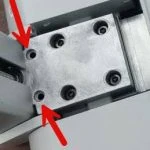
The left side gantry is missing 2 screws. This is normal. The castings for the left and right are the same and the Z - Axis stepper motor is mounted on the right side only.
Link to this answer #What spare parts should I order
As crazy as it sounds to a newcomer, the #1 spare part that you ideally should have is a spare complete printhead if you can swing it. They go on sale on occasion.
Secondly, you need a spare nozzle if for no other reason than troubleshooting a clog or extruder issue. Nozzles can be purchased at Amazon in four packs with all the popular sizes. Amazon Link
Ordering a complete hotend/cutter assembly is a fantastic option as well. It not only gives you the nozzle, but everything else you will need if you get the blob of death including all three latches that give everyone problems. Amazon Link
Link to this answer #Getting 3MF Errors in Anycubic Next
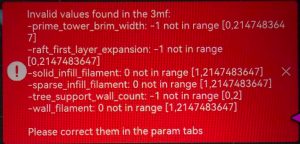 This is a common complaint and does not indicate a problem. The file you are trying to load was saved on a different brand/model printer. Beyond model geometry, 3MF files hold printer related settings that may or may not be compatible with your printer. This normally does not affect your print and can be ignored. Everyone has a different technique for processing this and we are not going to go into detail here. Just know nothing is broke 🙂
Unusual Noises
In general 3D printers can make some unique noises based on the harmonics of the model. Beyond that here are a few Kobra related common noises.
- PETG Squeak. For whatever reason the Kobra X has complaints from many users with squeaking when running PETG. No one really seems to know why, but it's a common issue and is considered normal.
- Loud vibrating every time a print starts. This is part of the startup calibration process doing a resonance calibration. This cannot be turned off with current firmware.
- Small vibration rattle during printing. Many users have issues with the printhead cover vibrating. This can be tested by removing the front cover.
- Rumble sound while printing. When using grid style type infill the tip of the nozzle drags across the infill and makes a rumbling sound. Switching to gyroid infill stops this. This is common to most all printers.
- Shrill sound as print bed moves back and forth. Common issue if you do not get the build plate on correctly. It can scrape the metal on the poop ejector and make a high pitched noise
Clogging Error but no Clogs
Common complaint. Please see this page for more details.
Link to this answer #Adjusting Z-Offset
This is some of the poorest advice you will find online. Although Z-offset can be used to tweak some prints, it should NEVER be used to fix a printer that is not printing. I am amazed the people having problems with printing and people jumping in and telling them to adjust their Z-Offset. This printer adjust this automatically and should print fine. Experienced people can make slight offset changes but its NOT the fix for a nonfunctioning printer.
Link to this answer #No matches found. Try a shorter search or another category.